
Wolf Pose Tool 3D6.8.105 - Google Play
You'll be able to see results in few seconds.
Publisher Description
http://www.alienthink.com
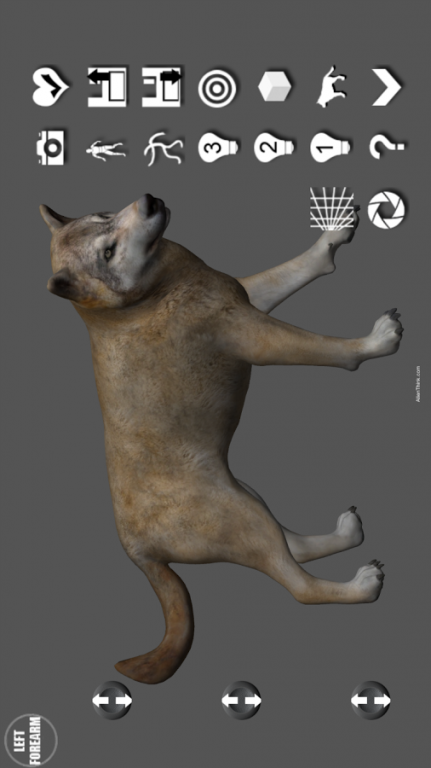
Breakthrough wolf posing tool for the artist. You can create any pose quickly with an easy to use pose interface. Its simple, just select the wolf body part and then pose the wolf anyway you want. The coolest feature most important to artist is the wolf uses no constraints allowing geometry to intersect. This allows Artist to pose from realistic to extreme poses. Use it for Drawing, Manga, Illustration, Character Design, Animation, Story Boarding, Comic Books.
The Wolf Pose Tool 3D was designed by the Artist Riven Phoenix who brought you super hit 'Pose Tool 3D' app for figure drawing artists. His Pose Tool 3D apps were declared the top 10 must have art apps by imagineFX magazine.
The Wolf Pose Tool uses state-of-the-art 3D Engine that allows you to pose a organic model.
Touch Controls:
- One Finger - Orbit around figure
- One Finger Tap - Select body part
- Two Finger Pinch - Zoom in and Out and Pan at the same time. This feature gives you the ability to setup dramatic shots for your poses quickly. Very powerful feature.
Menu Features:
- Pose Buttons
- Help Menu
- Save Current Pose
- Load Last Saved Pose
- Center Wolf
- Reset Wolf Pose to Starting Pose
- Hide Menu Bar
- 3 Point lighting System
- Gesture System mode
- Life Drawing Mode
- Mannequin Mode
- Cube Guides
- Perspective Guide
- Screenshot
- Camera FOV
- Sketch Mode
Wolf Organic Moving Parts:
- Head
- Jaw with teeth
- Neck
- Chest
- Abs
- Waist
- Hip
- Shoulders
- Forearms
- Wrist
- Hands
- Thighs
- Legs
- Shins
- Foot
- Tail
AlienThink.com
About Wolf Pose Tool 3D
The company that develops Wolf Pose Tool 3D is AlienThink,Inc. The latest version released by its developer is 6.8.105.
To install Wolf Pose Tool 3D on your Android device, just click the green Continue To App button above to start the installation process. The app is listed on our website since 2019-08-16 and was downloaded 0 times. We have already checked if the download link is safe, however for your own protection we recommend that you scan the downloaded app with your antivirus. Your antivirus may detect the Wolf Pose Tool 3D as malware as malware if the download link to com.alienthink.wolfposetool3d is broken.
How to install Wolf Pose Tool 3D on your Android device:
- Click on the Continue To App button on our website. This will redirect you to Google Play.
- Once the Wolf Pose Tool 3D is shown in the Google Play listing of your Android device, you can start its download and installation. Tap on the Install button located below the search bar and to the right of the app icon.
- A pop-up window with the permissions required by Wolf Pose Tool 3D will be shown. Click on Accept to continue the process.
- Wolf Pose Tool 3D will be downloaded onto your device, displaying a progress. Once the download completes, the installation will start and you'll get a notification after the installation is finished.
Program Details
System requirements
Download information
Pricing
Version History
version 6.8.105
posted on 2019-08-16
bug fixes
version 6.8.85
posted on 2016-03-29
- Gesture system adjust,- Cube Guides Adjust,- updated new realtime Sketch mode for artists to quickly create drawings for illustrations, childrens books, storyboarding, comic books, manga, digital painting and animation
Disclaimer
Official Google Play Link
We do not host Wolf Pose Tool 3D on our servers. We did not scan it for viruses, adware, spyware or other type of malware. This app is hosted by Google and passed their terms and conditions to be listed there. We recommend caution when installing it.
The Google Play link for Wolf Pose Tool 3D is provided to you by apps112.com without any warranties, representations or guarantees of any kind, so access it at your own risk.
If you have questions regarding this particular app contact the publisher directly. For questions about the functionalities of apps112.com contact us.
